
But choosing the right solution can be a major challenge. You have to navigate a complex landscape of phone-based readers, tap-to-pay apps, handheld terminals, and virtual terminals. The key is to find a setup that balances cost, reliability, security, and a seamless fit with how you actually do business.
This guide will walk you through the different types of mobile processing, break down the true costs, and help you select the right approach for your US-based business.
Key Takeaways
- Mobile payments can be accepted through a Bluetooth reader, tap-to-pay on a phone, a standalone terminal, a mobile POS app, a virtual terminal, or an ecommerce gateway.
- Compare the total cost, not just the hardware price. This includes processing rates, software subscriptions, PCI fees, and chargeback costs.
- Card-present (dipped/tapped), keyed-in, invoice, and ecommerce transactions all have different risk profiles and processing rates.
- Choose a provider that supports your specific business model, integrates with your existing software, and offers robust security and support.
What Mobile Credit Card Processing Includes
Mobile credit card processing is a system that uses a smartphone, tablet, or handheld terminal to securely transmit payment information. When a customer pays, the device communicates with your payment processor, the acquiring bank, the card network (like Visa or Mastercard), and the customer's issuing bank to approve or decline the transaction in seconds.
Card Readers vs. Mobile POS Systems
A simple mobile card reader is a small device that connects to your phone or tablet (usually via Bluetooth) to capture card data. Its primary job is to read the information from a card's chip or contactless signal.
A mobile Point of Sale (mPOS) system is more comprehensive. It's an app or platform that not only processes payments but may also include features for:
- Managing products and inventory
- Issuing digital or printed receipts
- Calculating and tracking tips
- Running sales reports
- Setting permissions for different staff members
- Building customer records
Card-Present vs. Card-Not-Present Transactions
How you capture card data affects both security and what you pay per transaction.
- Card-Present (CP): The customer is on site and dips a chip card or taps a card or phone (NFC). These are usually the most secure and lowest-cost transactions.
- Card-Not-Present (CNP): The physical card is not read by a device—phone orders, online checkout, email invoices, or keyed-in numbers. Higher fraud risk means higher processing rates.
The Role of Gateways and Virtual Terminals
For businesses that don't rely on in-person sales, other tools are essential.
- Payment Gateway: This is the technology that securely connects your website's shopping cart to the payment processing network. It's vital for any ecommerce business.
- Virtual Terminal: A virtual terminal is a secure web page where you can manually type in a customer's credit card information to process a payment. It's perfect for businesses that take orders over the phone or by mail.
- Merchant Account: This is the specialized bank account required to accept credit and debit card payments. Funds from your sales are deposited here before being transferred to your regular business bank account.
Types of Mobile Credit Card Processing Solutions
The right mobile payment setup depends on how and where you collect money—not on a single default device.
Bluetooth Card Readers
These pocket-sized devices pair with your smartphone or tablet and are controlled by a payment app. They are highly portable and ideal for sole proprietors or small teams that need to take payments on the go. Entry-level readers are relatively inexpensive, but remember to factor in the app's software fees and transaction rates.
Tap-to-Pay on a Phone
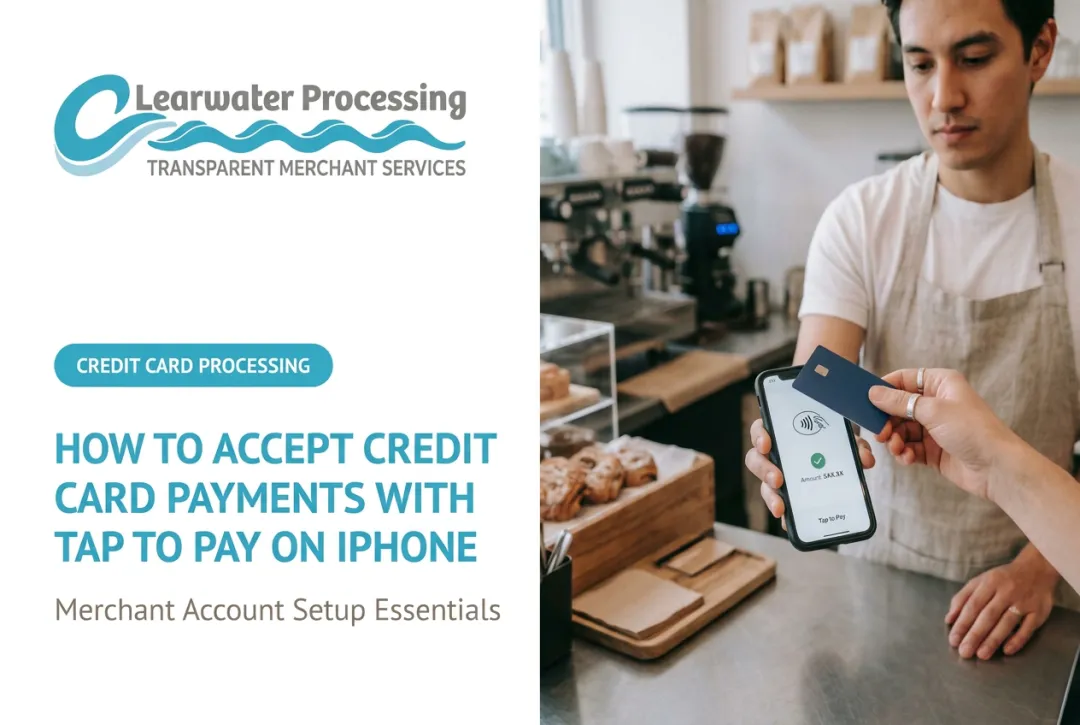
Some modern smartphones can now function as a payment terminal without any extra hardware. Using a compatible payment app, customers tap a contactless card or digital wallet directly on your phone.
Mastercard classifies this method as a secure, card-present EMV transaction. It minimizes equipment, but only if your device and operating system are supported.
Standalone Handheld Terminals
These all-in-one devices combine a screen, card reader, and sometimes a built-in receipt printer. They run on their own, with no phone tether required. Handheld terminals cost more than phone-based readers, so weigh the upfront price against how often you'll use the built-in screen and printer.

They fit restaurants, busy retail floors, and event vendors who need several staff members taking payments at once.
Virtual Terminals for Keyed Entry
For B2B companies, law firms, and contractors who take card details over the phone, a virtual terminal is the solution. Instead of physical hardware, you simply log into a secure website from any computer or mobile device and key in the payment information. Processors treat this as a card-not-present transaction.
Payment Gateways and Invoicing
If you sell online, a payment gateway is non-negotiable. It handles the security and data transmission for your ecommerce checkout. Many providers also offer invoicing solutions that allow you to email a customer a secure payment link—useful for service businesses collecting deposits or final payments.
Many businesses need a blended approach. A plumbing company, for example, might combine:
- A mobile reader for on-site payments
- A virtual terminal for phone payments
- Recurring billing for service contracts
Clearwater Processing builds these tailored environments—standalone terminals, ecommerce gateways, and back-office billing—around how each merchant actually gets paid. For recurring billing, Clearwater can also automatically update customers’ cards that are about to expire, which saves time and retains revenue automatically.
Match the Solution to Your Business Workflow
The right technology should make your job easier without adding complexity. Match these common business models to the mobile tools that fit how you actually get paid.
- Field Service Businesses (HVAC, Plumbing, Landscaping): Collect on-site deposits and final payments with a Bluetooth reader paired to a phone; add a virtual terminal for card-not-present payments when scheduling jobs.
- Retailers and Market Vendors: A standalone handheld terminal keeps checkout moving in peak hours and supports line-busting—EMV chip and contactless acceptance are essential.
- Event Planners and Caterers: Pair invoicing with payment links and a virtual terminal for deposits and staged invoices; bring a mobile reader for on-site event sales.
- B2B and Wholesale Firms: Prioritize a virtual terminal for phone and invoice payments, plus integrations with QuickBooks or Xero.
- Ecommerce and Online Businesses: Build on a secure payment gateway, then add recurring billing as you grow.
Before committing to any hardware or contract, always confirm that the processing solution integrates with any industry-specific software you already use for booking, accounting, or project management.
How to Compare Mobile Processing Costs
The price of the card reader is just the tip of the iceberg. To understand the true cost, you need to look at the entire fee structure.
Flat-Rate vs. Interchange-Plus Pricing
Most providers use one of two models:
- Flat-rate pricing — one predictable rate on every transaction (typically a flat percentage plus a small per-transaction fee). Simple to forecast, and a common fit for new or lower-volume businesses.
- Interchange-plus pricing — the provider passes through the card network’s interchange fee (Visa, Mastercard, and others) and adds fixed processor fees. Rates vary by card type and how the payment is processed (tap, dip, or keyed-in).
For example, a card-present debit transaction might carry interchange around 0.80% + $0.15, while the same card keyed in could run 1.65% + $0.15.

For established or higher-volume businesses, interchange-plus is often the lower-cost path once volume adds up.
Reading the Fine Print
When you compare providers, look past the advertised rate and line up every cost that hits your statement:
- Hardware — upfront price of readers or terminals
- Software — monthly fees for the POS app or virtual terminal
- Per-transaction fees — rate on each swipe, dip, tap, or keyed-in payment
- Gateway fees — monthly charges for ecommerce connections
- PCI compliance fees — charges tied to required data-security standards
- Chargeback fees — often $10–$100 when a customer disputes a charge
- Funding fees — extras some processors add for next-day or instant payouts
A cheap reader gets expensive fast when it locks you into high rates, paid software, and weak support.
Already accepting cards? A merchant statement analysis from Clearwater Processing can surface hidden fees and confusing line items—and clients see 10%–30% savings on average.
Security, Reliability, and Implementation
Your payment setup has to protect cardholder data and stay online when you are ready to collect.
Core Security Protections
Look for a solution that offers multiple layers of security:
- EMV chip and NFC: Modern card-present standards that cut counterfeit fraud versus magstripe
- Encryption and tokenization: P2PE scrambles data at capture; tokenization replaces the PAN with a one-time token
- PCI DSS compliance: Your provider must meet the Payment Card Industry Data Security Standard (PCI DSS); v4.0.1 was published in 2024
- Fraud monitoring: Systems that flag unusual velocity, location, or ticket patterns in near real time
Manually keying a card number is riskier than dipping or tapping. A 2026 Federal Reserve Bank of Kansas City review of debit card data found card-not-present fraud rates were significantly higher than card-present rates.
For phone or remote payments, use a secure virtual terminal instead of open key-entry outside a compliant workflow.
Reliability and Connectivity
If you lose connectivity, many mobile apps offer offline mode: they store the transaction securely and submit it for authorization when you reconnect.
In the US, that sale is not approved until it goes online. It can still decline later, and you may own the loss—so treat offline capture as a contingency, not your default.

Implementation Checklist
Before you go live, run through these final steps:
- Check compatibility: Confirm the app and reader work with your phone or tablet.
- Verify coverage: Test Wi-Fi and cellular at every spot you will take payments.
- Plan for power: Check reader battery life and keep a backup power source on hand.
- Set up receipts: Choose email, text, or printed receipts before your first live sale.
- Configure settings: Set tax rates, tip prompts, and employee permissions.
- Run a test: Process a small test transaction end-to-end before go-live.
Confirm settlement times before you launch. Many processors fund in one to two business days.
How Clearwater Processing Supports Mobile Card Acceptance
Clearwater Processing can bring the pieces covered above into one setup: stand-alone terminals for on-site sales, a virtual terminal for phone orders, and an ecommerce gateway for invoices and online payments, so you can process cards anytime and anywhere you work. PCI compliance is mandatory across its portfolio and comes with $100,000 breach protection insurance, a useful backstop when card data moves through phones and handhelds in the field. Next-day funding helps tighten cash flow, and when a batch needs attention, U.S.-based backend phone support is available 24/7/365. Wherever you take payments, one dedicated representative with industry experience is your single point of contact, a real person reachable on their cell phone rather than a chat box.
Frequently Asked Questions
How much does a mobile credit card reader cost?
Simple Bluetooth readers are relatively inexpensive, while a standalone terminal costs more, often several hundred dollars. Ongoing software fees and per-transaction rates usually matter more than the upfront price.
How can I accept credit card payments through my phone?
You can use a compatible payment app that enables tap-to-pay directly on your phone, or you can pair your phone with a Bluetooth card reader. You'll also need a merchant account with a payment processor and a reliable internet or cellular connection.
What is the best way for a small business to accept credit card payments?
It depends on how you sell: mobile readers or tap-to-pay for in-person sales, a virtual terminal for phone orders, and a payment gateway for online stores. Many businesses use a mix of these tools.
What is the best mobile credit card processor?
No single processor fits every business. Compare transparent pricing, funding speed, integrations, security, and support quality against your transaction mix and volume.
Which mobile card reader is best?
Choose based on phone compatibility, offline use, battery life, and the POS software bundled with it—and weigh total solution cost, not just the reader price.
How safe is paying by credit card over the phone?
Phone payments can be very secure when handled correctly. Use an approved virtual terminal that uses tokenization, never write down card numbers or store them in unsecured files, and ensure your staff follows PCI-compliant procedures for handling sensitive data.